
ROM: screen an RFQ quickly
Use envelope, volume and estimated weight to assess process suitability and a rough-order-of-magnitude cost range in your own costing tool.
Instant Quoting
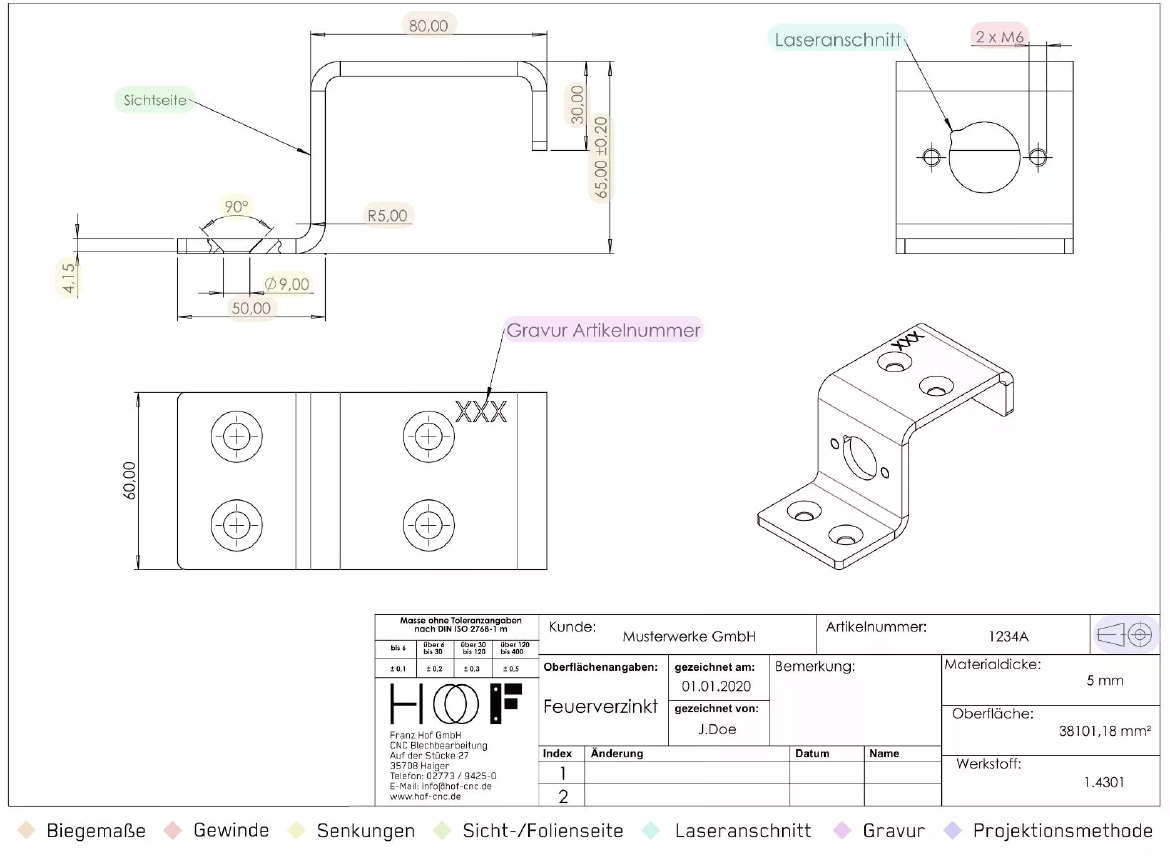
Give estimators and costing systems high-speed inputs—not another manual redrawing task. Choose rough geometry assessment or detailed drawing-data extraction.
Source evidence · inspectable results · engineering options
3D Spark is trusted by




Today
Drawing-only enquiries consume estimating time collecting dimensions, materials and geometry—even before your team decides which process to quote.
With Voluminate
Prepare the geometric and drawing-defined inputs once, then let your estimators and costing tools apply the commercial rules.
The workflow
Use the supported drawing source, with its views, dimensions, notes and title block.
Assess rough geometry for a ROM quote, or extract structured drawing information for detailed estimating.
Use volume, surface area, bounding box and density-based estimated weight alongside drawing dimensions and available material notes.
Use drawing data as JSON in your quotation workflow. ERP and costing tools apply rates, process rules and commercial terms.
Use envelope, volume and estimated weight to assess process suitability and a rough-order-of-magnitude cost range in your own costing tool.
Collect dimensions, title-block information and available requirements as JSON without requiring a full 2D-to-3D conversion.
Voluminate extracts data. Your ERP, costing software and estimators determine material prices, machine rates, setup, tooling and margins.
Quoting-input comparison
Use the matrix below as a quoting-input checklist—not a claim of automatic manufacturing simulation. Drawing notes are extracted where present; process-specific costing stays in your tools.
| Process | Geometry inputs | Drawing data where present | Your costing system adds |
|---|---|---|---|
| Additive manufacturing | Volume, bounding box, surface area, estimated weight | Material and available drawing requirements | Build orientation, supports, nesting and machine rates |
| Casting | Volume, surface area, envelope, estimated weight | Material, dimensions and available tolerance notes | Tooling, shrinkage, yields and finishing |
| Forging | Volume, envelope and estimated weight | Material, dimensions and available requirements | Billet, dies, allowances and process sequence |
| CNC milling / turning | Bounding box, volume and surface area | Dimensions, holes, threads and tolerance notes where present | Stock, operations, setup, tools and cycle times |
| Sheet metal | Envelope and surface area | Thickness, material, dimensions and bend notes where present | Flat pattern, nesting, cutting and bending rules |
Your numbers, your business case
Compare estimating effort and additional quote potential with the optional lost-request inputs.
No. Drawing-data JSON is a separate extraction path for dimensions and title-block information; it does not require a complete CAD reconstruction.
ROM uses geometry and assumptions for early screening. Detailed quoting adds available drawing-defined dimensions, material and requirements, then applies your process and commercial rules.
Volume, surface area, bounding box and estimated weight support early geometry assessment. Weight is calculated from volume and material density, not measured on the physical part.
No. Voluminate prepares data; your ERP, costing tools or estimators apply material costs, process rates, setup, tooling, quantities and margins.
Yes, the matrix identifies useful geometry and available drawing fields for those workflows. Support does not imply automatic toolpath, tooling, nesting or process simulation.
This page does not promise a turnkey ERP connector. Structured JSON can be used in your existing data workflow; agree any integration requirements separately.